stems

stems loop

download for mac
free · apple silicon · macos 15+
cdj-3000x · ddj-flx10 · ddj-flx4 · or just the keyboard
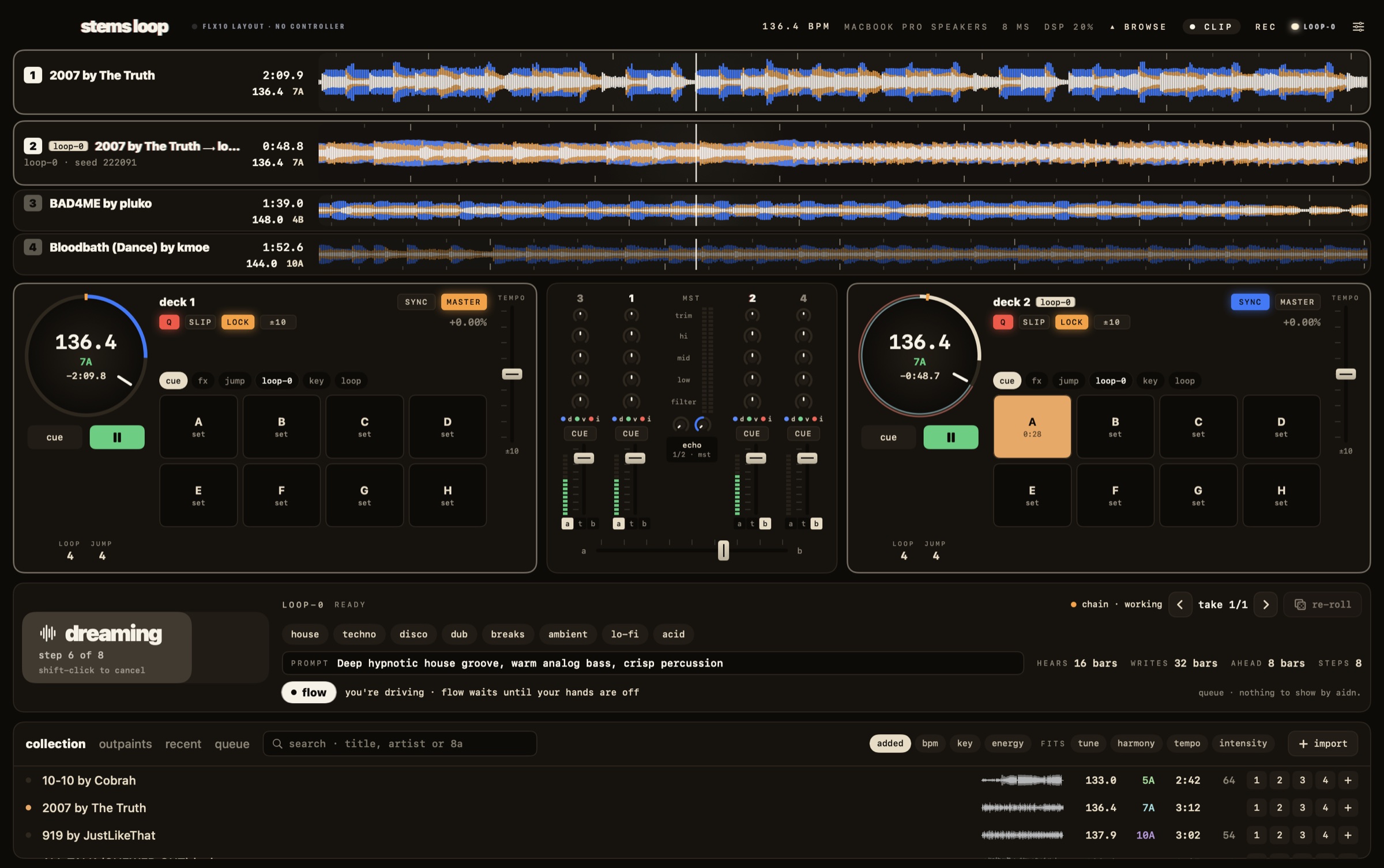
the stems loop stage: four decks of three-band waveforms, the deck panels, the live mixer, and loop-0 writing the next stretch
lanesevery deck as three-band waveforms. the decks under your hands run tall.
decksbpm, key, time and the pads in whatever mode the unit is in, lit like the hardware.
mixerlive, in the hardware's order. every knob on screen moves with its twin.
loop-0one key. it always shows the next thing: fork, drop, or keep going.
how a set goes

your records, then where they go next.

play a record like always. press fork and loop-0 listens to the whole mix — every deck, as you’ve blended it — and writes what comes after, in key and on the grid. when you want it, it’s there on deck 2. bring it in, play another record, fork again.

01

fork

loop-0 hears the room — both decks, the eq, the fx — and continues that, from the next bar. press it again any time for a fresh take.

02

drop

when it’s ready, it waits. drop starts it on deck 2 at exactly where your mix has got to, on the beat. bringing it in is yours.

03

chain

before a take runs out, loop-0 writes the next stretch from the last bar the room heard. it never has to stop.

04

flow

switch it on and the set runs itself: your record, loop-0’s take, the next best record, its take. it backs off the moment your hands are on.

plug in

it knows your setup.

in the booth, your cdj-3000x players are the decks and the djm mixes: each player plays its deck out of its own outputs, loop-0 included, like any record. at home, plug in a ddj-flx10 or ddj-flx4 and the screen becomes that unit: its decks, its mixer, its pads lit, its sound card as the output. on the flx10 the jog screens show bpm, key and time — no more “no audio driver”.

cdj-3000x

the club setup · two players · your djm mixing
  • SOURCE → SOFTWARE CONTROLon each player, then usb-c to the mac. nothing to install
  • CUE/LOOP MEMORYloop-0’s key: fork · drop · keep going
  • CUE/LOOP DELETEcancel, or a new take of the same spot
  • CALL ◀ ▶on loop-0’s deck: step through its takes
  • rotary · pushbrowse the crate · load onto this player
  • everything elsewhat it says on the player: jog, tempo, hot cues, loops, beat jump, sync

ddj-flx10

four decks · jog screens · mix point keys
  • MIX POINT LINKloop-0’s key: fork · drop · keep going
  • MIX POINT SELECT ◀ ▶step through the takes · shift: a new one
  • SAMPLER padsfork · drop · extend · re-roll · takes · chain
  • DECK 1/3 · 2/4which deck each side drives — the screen follows
  • DRUMS · VOCAL · INSTtake out the band each part lives in

ddj-flx4

two decks · the sampler pads
  • SAMPLER padsfork · drop · extend · re-roll · takes
  • everything elsewhere rekordbox has it: jogs, eq, filter, beat fx
no controller?
  • Z X · N Mcue and play, deck 1 and 2
  • G H T Yfork · drop · extend · re-roll
  • ← →crossfader
on your mac

it all runs on the laptop.

loop-0 is the stems model. it comes down once, with your free stems key, and from then on nothing leaves your mac — no account needed to play, no connection needed at the gig.

9.8 gb
loop-0, once. it starts by itself the moment your key checks out.
0
bytes off your mac while you play. it only listens on its own local port.
4
decks, with an a / thru / b crossfader and a phrase-locked auto mix.
m1+
any apple silicon mac on macos 15 or newer.
start

three things.

  1. downloadopen it and drag stems loop into applications. a short tour shows you around the first time.
  2. paste your keya free stems key from s7ems.com/get — the same one the plug-in uses. loop-0 then downloads by itself.
  3. playplug in the controller, load a record onto deck 1, press play, press fork.
download stems loop
free · apple silicon · macos 15+  ·  get a free key